
Senior Forward-Deployed Engineer · Insight, AI Apps & Data
The design-engineering
boundary is where I work.
Embedded with customer teams across healthcare, financial services, energy and field services. Strategy, analysis, design, front-end delivery - the whole arc, at senior depth.
Sydney, Northern Beaches to San Diego, on an E-3 visa
What stood out most was his judgement at the boundary between design and engineering.
About
I started in code in 2013, moved into design in 2016, and came back to engineering in 2022 without putting the design down. Two strands, separated for six years, running together since. Most designers stop at handoff. Most engineers don’t do the design work.
Engineering: 2013 to 2016, and 2022 to now. Design: 2016 to now.
2013
2016
2022 to 2026
Downer
Downer’s field teams ran on MyWork, a legacy platform at the end of its life. Insight was engaged to replace it with Axion by Downer.
- Axion by Downer, React and React Native
- Thousands of Australian tradespeople
- Coding agents against a design system
- Claude Code + OpenCode + GitHub Copilot
Coding agents ship components. The design system holds them accountable.
- CLAUDE.md@AGENTS.md import
- AGENTS.mdrepo-wide
- docs/AGENTS.mddocumentation
- docs/architecture/AGENTS.mdarchitecture
- src/frontend/AGENTS.mdfrontend conventions
- src/frontend/design/AGENTS.mddesign conventions
- src/frontend/shared/tokens/AGENTS.mdtoken package
- CLAUDE.md@AGENTS.md import
- AGENTS.mdrepo-wide
- docs/AGENTS.mddocumentation
- docs/architecture/AGENTS.mdarchitecture
- src/frontend/AGENTS.mdfrontend conventions
- src/frontend/design/AGENTS.mddesign conventions
- src/frontend/shared/tokens/AGENTS.mdtoken package
Six files. One instruction layer. Three agent harnesses.
.
├── CLAUDE.md                              # @AGENTS.md import
├── AGENTS.md                              # Repo-wide instructions
├── docs/
│   └── AGENTS.md                          # Documentation conventions
├── src/frontend/
│   ├── AGENTS.md                          # Frontend conventions
│   └── design/
│       └── AGENTS.md                      # Design conventions
├── src/frontend/shared/tokens/
│   └── AGENTS.md                          # Token package conventions
└── docs/architecture/
└── AGENTS.md # Architecture conventionsAxion by Downer is the field service platform Downer runs across their Australian operations - the software thousands of tradespeople open on their phone every morning to see the day’s orders, log hours, raise invoices, complete audits, and sign off jobs. Downer is one of Australia’s largest services companies, so this platform runs an operationally critical part of their business. Insight was engaged to build it from the ground up, replacing the legacy MyWork system. I’ve been leading design engineering across React and React Native - building the workflow where coding agents ship components against a design system that holds them to it. Storybook as the verification layer, tokens as the vocabulary, spec files the agents read every session.
You’re not building a mock-up. You’re building a framework for the code.
The working model
That was said as a diagnosis, not a compliment. On AxionConnect I didn’t produce mock-ups. I produced running components, and those components were the artefact everyone reviewed.
Building real components is slower per iteration than drawing them. The trade was deliberate: what the business needed to sign off on was behaviour, not appearance. Filters, scroll, density under worst-case data, what happens when an accordion holds three trades people instead of one. None of that survives a static frame.
The workflow is built around one principle: the thing the client reviews, the thing the tests run against, and the thing that ships are the same artefact.
What I’ve built alongside it

- The design system itself, built from scratch and cross-platform by design - React web plus React Native mobile on Expo
- Ownership of the Storybook instance, handed over by Insight architecture: “Going forward, Max will be the owner of this instance.”
- The
@axion/tokenspackage - semantic tokens as CSS custom properties, scoped by workspace - Production code: Order Detail Page and layout, tracking timelines, order list, contact card, dashboard restructuring, reactivation flows, and Create Order workflows including TreePicker, location hierarchy, asset selection, priority gating and duplicate detection
- Authentication and administration: login, registration, welcome flows, MFA, Admin User List, session and membership administration
How the work was made
The full workflow is written up on Insight’s engineering blog:Inside my AI design engineering workflow (opens in a new tab) - Storybook with MCP, axe-core gates, and Claude Code generating against a real design system. 14 May 2026.
The AxionConnect design engineering workflow, in nine parts. The model has held across a year of continuous delivery.
Context architecture
CLAUDE.mdat the root is ten bytes: an@import directive that pulls inAGENTS.md. The instructions live in a scoped hierarchy beneath it, so an agent working insrc/frontendpicks up frontend conventions without loading architecture docs it doesn’t need.Because the substance sits in the vendor-neutral AGENTS.md format and CLAUDE.md is only an adapter, one repository serves three agent harnesses without duplication. Four skills carry the domain knowledge an agent can’t infer from the codebase, and two plugins come from team marketplaces - one published by the backend lead. The AI tooling here is shared delivery infrastructure, not a personal setup.
CLAUDE.md
@AGENTS.mdAGENTS.md
# AGENTS.md
## Scope
Root instruction layer for coding agents working on the frontend.
## Directory hierarchy
- `docs/AGENTS.md` — documentation conventions
- `src/frontend/AGENTS.md` — frontend implementation
- `src/frontend/design/AGENTS.md` — design conventions
- `src/frontend/shared/tokens/AGENTS.md` — token package
- `docs/architecture/AGENTS.md` — architecture
## Rules
- All colour and spacing values reference `@axion/tokens`
- New components start in `_backlog/`, promote to `ui/` after review
- Design conventions live in `src/frontend/design/AGENTS.md`, invoked contextually
- `pnpm test` and `pnpm typecheck` before requesting review
## Portable across harnesses
Read by Claude Code (via CLAUDE.md), OpenCode, and GitHub Copilot.
CLAUDE.md uses the @ import directive to pull in AGENTS.md. Ten bytes of adapter, one substantive instruction file, three agent harnesses that can read it.
Design conventions are a file in that hierarchy rather than a wiki page next to it.
src/frontend/design/AGENTS.mdis what an agent reads before it writes a component, and the token rules in it are the same rules a reviewer would apply by hand.design/AGENTS.md
# design/AGENTS.md
## Scope
Design conventions for the frontend. Referenced by src/frontend/AGENTS.md
for design-specific work, and by the axion-design skill for contextual invocation.
## Token discipline
- All colour references use semantic tokens from `@axion/tokens`
- Prefer `--color-text-primary` over raw hex or primitive tokens
- Spacing values use the token scale, never arbitrary values
- Typography classes come from the token type scales
## Component composition
- Components read from tokens, never define their own colour or spacing
- Layout primitives (Stack, Cluster, Grid) handle spacing between components
- Interactive states (hover, focus, active) reference interactive tokens
## Accessibility
- Text uses a11y-safe semantic tiers (--color-strong, -default, -muted, -disabled)
- Interactive elements meet WCAG 2.2 AA contrast requirements
- Focus indicators use --color-focus-ring at 2px offset
## Motion
- prefers-reduced-motion disables all decorative animation
- Functional motion (loading, transitions) reduces duration by 50% under reduced motion
Design conventions as first-class instruction. Referenced by the frontend AGENTS.md and invoked by the axion-design skill for contextual work. Discovery inputs
Design decisions come from three sources the agent can read: thirteen field specification spreadsheets, one per section of the order detail screen, giving every field its source in the legacy system and its business rules; the architecture documentation; and sixteen recorded client sessions across six months.
The transcripts are the richest source of intent, and they are deliberately gitignored. Discovery material informs the work without entering the repository. Decisions that come out of it are recorded separately in
docs/wiki/Design-Decisions/.Specification before implementation
Work moves through a codified command chain rather than ad-hoc prompting - twelve slash commands in
.claude/commands/, withspecify,plan,refineandimplementas the spine.The sequencing is the point. The expensive failure mode on this project was building a screen, showing it, and discovering the information architecture was wrong. Specifying and refining first moves that discovery to the cheap end.
# The AxionConnect workflow: specify before implement
$ /specify order-detail-page
$ /plan order-detail-page
$ /refine order-detail-page
$ /implement order-detail-page
# Supporting commands
$ /analyse        # Analyse existing code
$ /troubleshoot   # Debug specific issues
$ /code-review    # Review changes
$ /review-pr      # Review pull requests
$ /security-audit # Security review
$ /bff-e2e        # End-to-end tests
$ /apim-sync      # API management sync
$ /save           # Save session state
Twelve slash commands. Sequencing forces specification before implementation, which is where the expensive failure mode used to live. Storybook as the substrate
Storybook isn’t a documentation site on this project. It’s the one surface four separate concerns run against: every client review session is conducted against live Storybook, axe checks run on every story as it’s built, the coding agent reads stories directly through addon-mcp, and Playwright tests run against stories rather than application routes. Six months of review screenshots in the project archive are captures of localhost:6006.
One component, two runtimes
The mobile package runs two Storybook configurations against the same components: one on-device React Native, and one running those components through react-native-web with an Expo native-module stub layer and a full babel and webpack bridge.
The web configuration exists so mobile components can be reviewed in a browser, in a client call, without a device or simulator in the loop. Building that bridge was a cost paid once to make every subsequent mobile review frictionless.
Verification
Layer Tool Scope Component interaction Playwright 1.58 Web, against Storybook Unit Vitest 4.1 Web, document viewer, validators Mobile unit Jest (jest-expo) React Native Accessibility axe via addon-a11y Every story Security semgrep scan --config auto Whole repo Dependency audit scripts/audit.mjs Runs on every postinstall The security scanning is worth noting: the audit script is wired into
postinstall, so it runs on install rather than waiting for anyone to remember it.The promotion gate
src/frontend/_backlog/holds early component work that isn’t yet part of the system. Components sit there until they meet token alignment and pass review, then they’re promoted intoui/orpatterns/.This is what keeps the design system coherent under delivery pressure. A component built quickly for one screen doesn’t silently become a system primitive; it waits until it earns the promotion.
Shipping
Of the six Azure Pipelines, the one that matters here is
storybook-pipeline.yml. The design system builds and publishes as its own artefact, alongside the web, mobile, BFF API, event processor and Auth0 tenant pipelines. It ships like a product, not as a by-product.The client loop
Working sessions ran roughly weekly, plus near-daily short calls. The pattern that emerged, and the one I’d carry to another engagement: bring options rather than a proposal, and name the trade-off of each before anyone asks.
In one session on an unresolved information architecture problem I brought three built concepts. Three stakeholders held three different positions at the start of that call; it closed with a decision and one refinement in under twenty minutes. Say the weakness out loud, and clear feasibility with engineering first, so the design conversation is never blocked on a technical unknown.
What this workflow doesn’t do
Worth stating plainly, because the omissions were choices.
There’s no Figma in this pipeline. Design specs are markdown the agent reads, and the design itself exists as code. There’s no visual regression tooling - accessibility and interaction are automated, appearance is reviewed by eye. And there’s no automated grading of design quality. axe-core can tell you the contrast passes and the roles are right. It can’t tell you whether a screen holding twenty-seven line items, seven warnings and a scheduling timeline is actually readable.
Well understood, signed off by every stakeholder, and expensive on the legacy database under filtering.
Load once, filter locally, virtualise the visible rows. A different interaction model, and one the database can carry.
The order list was initially designed with server-side pagination - the standard enterprise data grid pattern, well understood by every stakeholder in the review. It looked right. It read right. Everyone signed off.
Then the backend feasibility conversation surfaced the constraint: server-side filtering across the full order set was expensive on the legacy database. Every filter change would hit performance hard. The pattern that looked right in review would fall over in production.
The design pivoted to client-side windowing. Different architecture, different interaction model, different mental model for users trained on paginated lists elsewhere in the platform. The design that survives review is the one that also survives the constraints reviewers can’t see.
Recognition
If I get fired for all the deadlies, deletes, and fields that are missing in switches, the one thing I’m not going to do is Andy is not going to sack me because it doesn’t look like crap. It looks really schmick.
Everything you’ve got up in the top here, you’ve done brilliantly. So your contacts all that, you’ve relayed that out. I like it much better than this.
You nailed it before, Max. You got it spot on perfect. And then, yeah, but it’s by TP order, which is perfect. It makes a lot more sense.
Stack and tooling
- Application
- Verification
- Delivery
- Agent tooling
What I took away
- The work that feels like overhead - the AGENTS.md hierarchy, the naming, the
_backlog/promotion gate - is what lets AI move fast without breaking what matters - Design-engineering work is most valuable upstream, where decisions compound
- The best client review artefact is the one that also runs the tests
- Clear feasibility with engineering before proposing to the client. What survives review must also survive production.
Vitrafy
Vitrafy had an MVP concept for cryopreservation software. Insight was engaged to turn it into production enterprise SaaS.
- Live product at vitrafy.com
- Hoxworth Blood Center, Vitalant (US)
- Template-driven workflow authoring
- Sole design engineer since July 2025
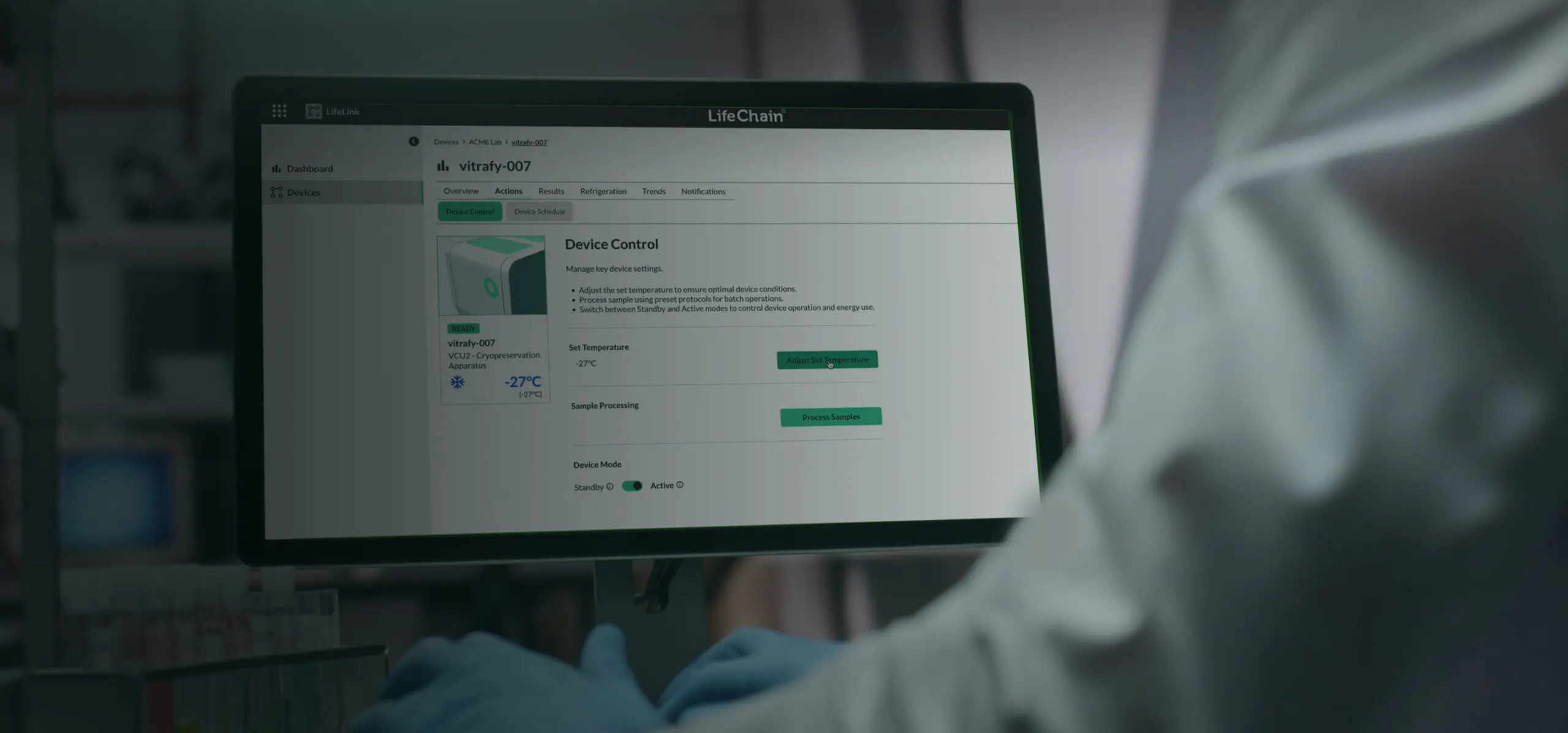
The interface enterprises trust AI to build. Live at Vitrafy.

Deployed with
- Hoxworth Blood Center
- Vitalant
Vitrafy engaged Insight to take LifeChain from MVP concept to production-shipped enterprise SaaS. The platform is now live, publicly marketed by Vitrafy, and deployed with named US healthcare partners. The interfaces on Vitrafy’s product page are the ones I designed.
Authoring a workflow
A workflow is not drawn from scratch. It is named, then instantiated from a contract template - Human Platelets, Human Sperm, Assisted Reproductive Therapy, CAR-T - and the stages and activities come with it. The templates are the product knowledge; the builder is the way a lab reaches them.

The product
LifeChain is the software platform behind cryopreservation - workflow orchestration and sample management for blood banks, cell therapy programs, biobanks and biomedical laboratories handling ultra-low-temperature specimens. It solves four things: sample spoilage, traceability gaps, workflow inefficiencies, and auditable data integrity.
What I shipped

- The Vitrafy Design System - atomic model, typography and colour standards, component architecture, mapped 1:1 to the Chakra component library we both build against
- The platform’s core surfaces: workflow builder, sample management, device integration, dashboard, global navigation, user administration
- Workflow design for critical clinical processes - human platelet workflows, CAR-T logistics, sample tracking, device protocol management
- A design-engineering operating model that continues to shape how Vitrafy delivers
The design engineering approach

1:1 mapping between Figma tokens and the Chakra component library in code. Atomic design from atoms through molecules to organisms, with universal change propagation. Designer and developer estimates aligned 1:1, eliminating the “design says 2 weeks, dev says 6 weeks” gap that kills enterprise design system delivery.
Base component library plus purposeful customisation - built on Chakra rather than starting from scratch or maintaining large global CSS. Two-way collaboration: what’s the best way to build this so it works for both of us.
Late in the engagement, the product architecture pivoted from an integrated single-product experience to a split product structure, for commercial and billing reasons. The design decision at that moment wasn’t visual - it was information architecture. Every entry point, every navigation state, every product chooser needed to reflect the new commercial reality without confusing users who’d already learned the unified model.
The design system I’d built absorbed the pivot without breaking, because the tokens and components were structured around user tasks rather than product boundaries. Systems built to reflect commercial structure fracture the moment the commercial structure changes.
The takeover
Joined the engagement in December 2024 alongside Brian Pheiffer. Took over solo in July 2025 following Brian’s handover. The customer chose to continue with me as sole design lead. Their own technical lead put it plainly.
He did not simply hand over mockups and step away.
What stood out most was his judgement at the boundary between design and engineering. He stayed close to implementation, contributed to technical discussions where his perspective added value, and took ownership of the design system standards that the broader team built against. The work Max established continues to influence how we think about design and delivery at Vitrafy.
The outcome
The platform is deployed. The customer partnerships are named and public. The interfaces I designed are being marketed by Vitrafy on their own site.
2
6
1:1
Stack and tooling
- Application
- Component library
- Design system
- Design
What I took away
- 1:1 design-to-code mapping is what makes design systems durable at enterprise scale
- The design-engineering boundary is where craft becomes trustworthy
- Sustained engagement earns trust, and trust is what lets designers keep making the decisions that matter
- Build systems around user tasks, not commercial structure. Commercial structure changes.
AMP
AMP’s advisers worked across five disconnected systems, three of them Salesforce. Insight was engaged to design one platform to replace them.
- UX for the unified advice platform
- 2,000-2,500 advisers, 350-400 practices
- Five systems, three of them Salesforce
- Six, from advisers to audit
- ClientHubFinancial Services Cloud - advice agreements, invoicing, KYC
- PRMLicensee and practice relationship management, onboarding, vetting
- eCRMAMP’s enterprise instance - complaints
- AdviserIQAdvice knowledge repository
- Advice Data LayerAWS data lake, reporting through Power BI
AMP Advice runs one of Australia’s largest financial advice networks. Between 2,000 and 2,500 external practice users work across 350 to 400 practices in four brand networks - AMP Financial Planning, Charter Financial Planning, Hillross Financial Services, and Jigsaw Advice Solutions - supported by 200 to 250 internal staff handling compliance supervision, operations, telephony, relationship management, audit and vetting. Together they manage more than 100,000 practice client relationships. Before this engagement they worked across five disconnected systems - ClientHub, PRM, eCRM, AdviserIQ and the Advice Data Layer, three of them Salesforce. Different data models, different vocabularies, different login flows, and no single view of an adviser or a client.
Insight was engaged to design a unified platform to replace all five. I led the UX across the 7-week Discovery and Design phase, working alongside a solution architect, a functional architect, and an integration architect from the Insight team. The challenge wasn’t technical migration - it was designing one coherent experience that served radically different user needs through role-based context. The same discipline I now apply to AI coding workflows: understand the diversity of who’s using the system before designing the interface.
The diversity of users the platform needed to serve
The Discovery phase explicitly designed workshops around the different user constituencies. Each had distinct workflows, permissions, and success measures.
Creating agreements, generating invoices, capturing signatures, processing payments, managing KYC, maintaining profiles, submitting compliance, accessing knowledge and reporting. Across 350 to 400 practices with different structures and compliance obligations.
Managing adviser and practice relationships, tracking interactions, coordinating account management. A full view of every adviser and practice, but a different view from what the advisers themselves needed.
Supervising compliance activity, auditing advice quality, vetting new advisers and practices, handling complaints. Seeing across advisers and clients in ways individual advisers could not.
Routing workflows, allocating activities, tracking SLAs, monitoring service delivery. Operational visibility across every process in flight.
Handling inbound queries from advisers and clients, needing quick context on any conversation.
Independent review of adviser practices, compliance evidence, and client outcomes. Cross-cutting access without owning individual client relationships.
Six distinct constituencies, one platform. The design decision that made this work was role-based context - same navigation surface for everyone, adapting content and actions to who was logged in.
The unified experience thesis
Each user constituency needed different data, different actions, and different workflows. The obvious approach would be to build multiple products behind a shared login - an adviser portal, a compliance portal, an operations portal. That would have fragmented the experience without solving the underlying problem of no shared source of truth. The platform I designed treated the underlying data as one system with role-based views layered over it. An adviser saw their own clients. A relationship manager saw all advisers in their portfolio. A compliance officer saw across advisers by risk indicator. Same navigation, same visual language, same interaction patterns - different content and different actions per role.
Integration as UX scope
The platform integrated with GreenID for identity verification, DocuSign for e-signatures, QValent for payment collection, and CommPay for settlement. The design decision that mattered was making those integrations invisible.
| The default UX | What I designed instead |
|---|---|
| GreenID: hosted verification page, external redirect | Inline verification step within the KYC workflow |
| DocuSign: email link to a hosted signing surface | Signature captured within the agreement flow, status updates in real time |
| QValent: redirect to a payment portal | Embedded payment step, control returns to workflow on completion |
| External system errors passed through raw | Errors caught and displayed in the platform’s own error patterns |
“Integration as UX scope” means treating third-party systems as capabilities to be composed into the experience, not services users are sent to. More design work per integration; the platform feels like one product rather than a hub connecting several.
The platform imposed a hard constraint: primary navigation is capped at five items. The instinct was to fight it - negotiate for a custom navigation pattern, or build our own component that ignored the platform default.
The wrong turn we deliberately didn’t take: overriding the platform to get the navigation we wanted. Instead the design worked within the platform’s native IA model - progressive disclosure inside those five items rather than expanding them.
The reason wasn’t just constraint discipline. It was future-proofing. We wanted the product to evolve automatically with the platform, not diverge from it. Fighting the platform would have won a design battle but lost the maintenance war. Every subsequent platform release lands cleanly because the design never left the platform’s model.
Same discipline as Arrow: design against the platform’s real constraints rather than pretending they aren’t there. The constraint becomes the shape of the answer.
What shipped
2,500
400
5 → 1
100K+
One platform replacing five disconnected systems. A single source of truth for every adviser, practice, and client. Insight has since published this work as a firm-wide case study, reused across proposals for other financial services and enterprise platform engagements.
Stack and tooling
- Platform
- Integrations
- Frontend
- Design
- Discovery artefacts
What I took away
- Unified experience doesn’t mean one interface for everyone. It means one coherent system that adapts to who’s using it, through role-based context rather than fragmented products
- Integration is UX scope. Third-party systems are capabilities to be composed into the experience, not places to send users
- Platform constraints are the shape of the answer. Designing within them creates products that evolve cleanly with the platform, not against it
- The design thinking that scales serves the diversity of users through the underlying system, not by proliferating separate surfaces
Arrow
Design tokens and a component library first, then the architecture built on them - a legacy SharePoint estate rebuilt for 800 employees across Queensland coal seam gas. Running on Arrow’s own infrastructure since 2023.
- System architecture and design system
- 800 employees across Queensland
- Live since 2023, on Arrow’s infrastructure
- Still running on Arrow’s infrastructure, three years on
The systems thinking that ships AI-integrated work at Downer today, applied in 2022 before the tools existed.
Click to zoom. Drag to pan.
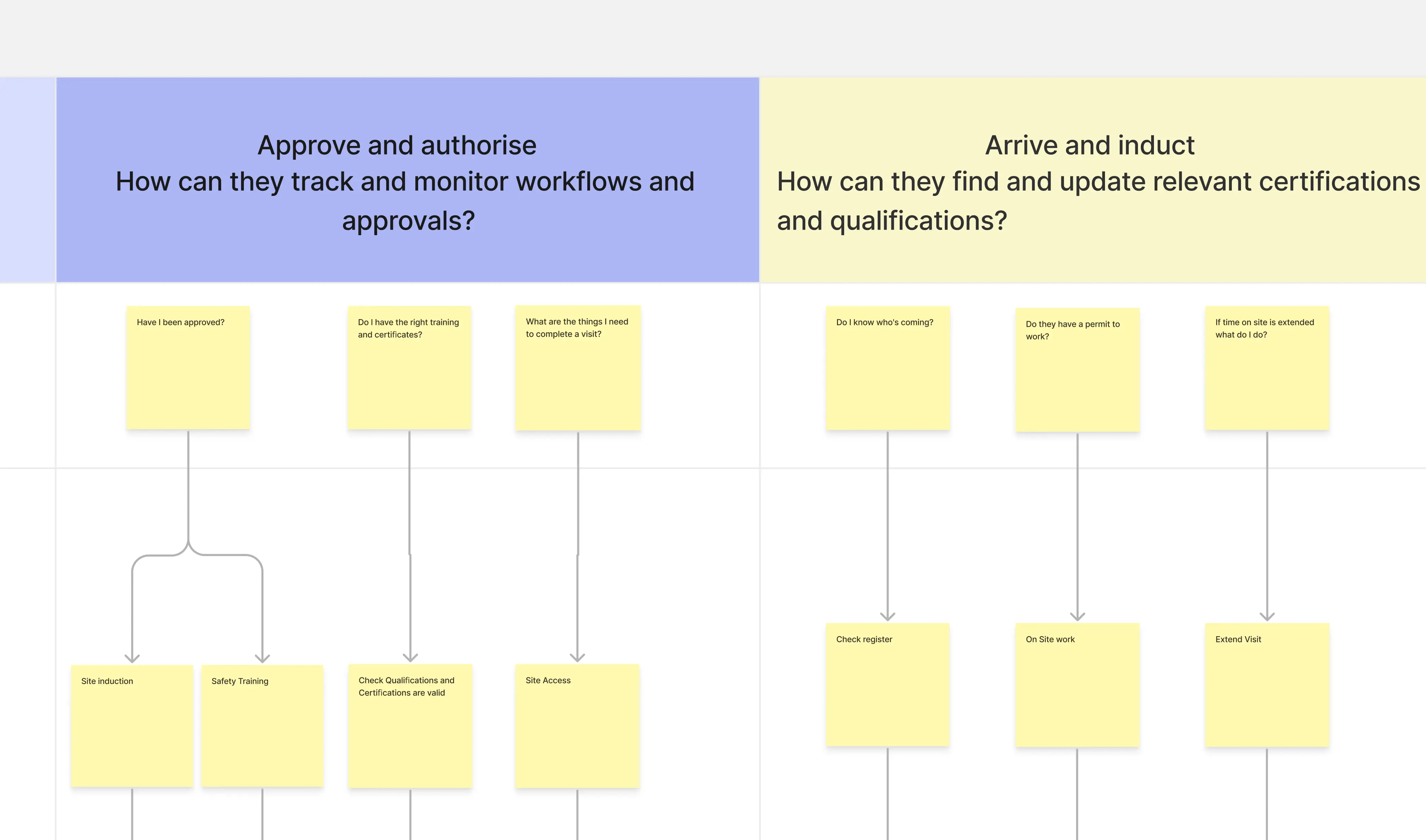
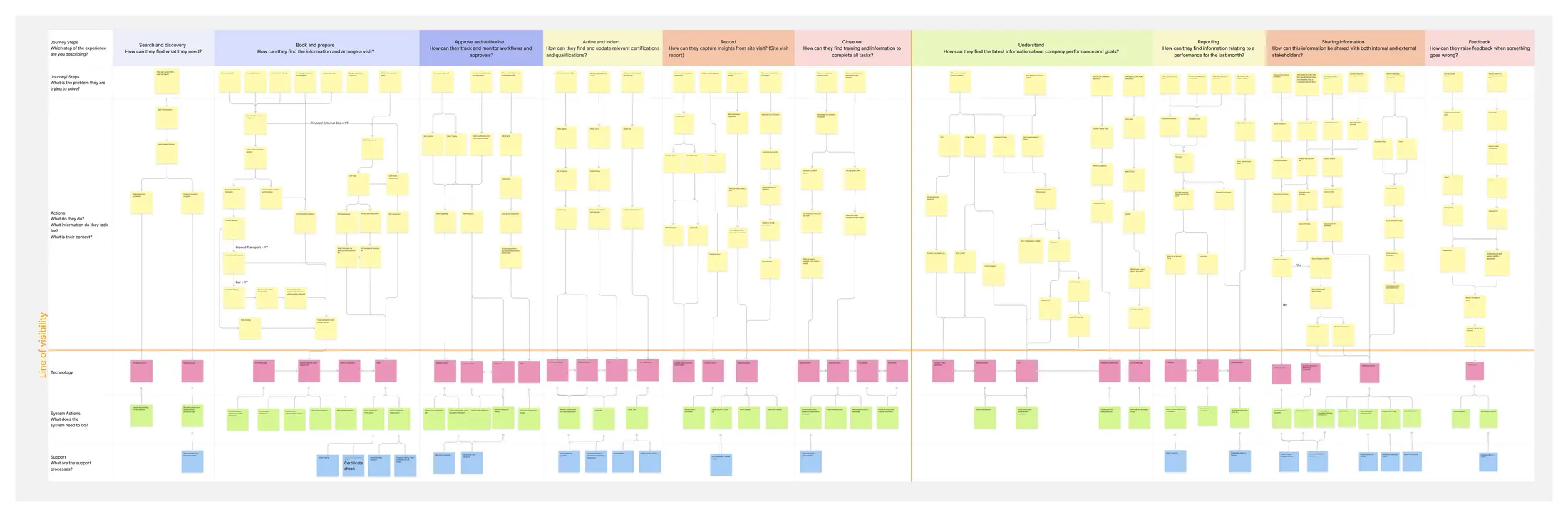
This is the service blueprint I led for Arrow Energy’s employee platform modernisation. It maps ten user journey phases across dozens of touchpoints - what 800 employees needed to do to search, book travel, get inducted onto sites, complete safety compliance, record and share information - alongside the systems supporting each of those actions. It wasn’t a discovery deliverable produced at the end of research. It became the artefact every downstream decision was traced back to: information architecture, navigation design, the extension patterns, the design system itself.
Arrow Energy is a Shell and PetroChina joint venture running coal seam gas operations across Queensland, and 800 employees were about to be migrated off a legacy platform going out of support. I led the blueprint with a business analyst and a functional architect from the Insight team, owning the structure, the journey mapping, and the connections between user actions and technical systems. It’s the same discipline I now apply to AI coding workflows: understand the system before designing the interface, and let every design decision be traceable back to what the system actually needs to do.
The architecture decisions
A flat structure using the platform’s hub site architecture, so future organisational changes wouldn’t require reshaping the platform’s foundation. Six hub-linked sites - home, news, personal, corporate, knowledge, admin - separated business content from administration and personalised data. Administrative artefacts (navigation, curated shortcuts, footer data) centralised in one admin site; personalised information handled through cloud storage. That separation was a maintainability decision.
The team committed to using platform functionality first, customising only when platform behaviour couldn’t meet requirements. The custom navigation component replaced the platform’s built-in option because the native version couldn’t satisfy the information architecture. The custom carousel replaced the native one because of styling and layout limitations, and the curated shortcuts for the same reason. These were not preferences - they were requirements the platform couldn’t hit, documented in the technical design.
Second-level navigation items required descriptions. Third-level navigation was capped at seven items. Navigation items had to support future imagery without structural changes. These weren’t stylistic preferences - they were governance decisions that determined what business users could and couldn’t do in the platform, encoded in the navigation component’s data structure.
The design system
The UI Guidelines document I authored was a production-ready developer specification - grid systems at three breakpoints, spacing tokens across the responsive scale, typography scales with defined hierarchy, iconography rules, thirteen documented components with defined behaviours. Developers implemented from the specification directly rather than interpreting wireframes.
The brief handed us two brand colours and a logo, and the instinct was to treat that as a limitation to work around. Negotiate for more brand assets. Argue for an extended palette. Two colours is not enough to build a full digital workspace across web, mobile, and workflow surfaces.
Except it was. Reframing the constraint as the design opportunity changed what got built. Two colours forced structural decisions the team wouldn’t have made with a bigger toolkit. Contrast had to carry meaning because there was no palette to hide behind. Type hierarchy had to work harder. Spacing became the accent. The system that emerged was more coherent than any version with a wider palette would have been.
The lesson isn’t about colour. It’s about designing with the platform’s real constraints as the frame rather than pretending they aren’t there. Same discipline I now apply to AI coding workflows: the system exists to hold agents accountable to specifications they can read, not to give them freedom they shouldn’t have. Constrained inputs force the thinking to be visible.
What shipped
800
2023
13
Arrow
The system runs on Arrow’s own infrastructure with no third-party vendor dependency. Insight has since published this work as a firm-wide case study, reused across proposals for Qantas, PTW, RUAH, and Vic Ambulance.
Recognition
When I presented the work internally at Insight, Trent Cain, our Practice Lead for Design and Adoption, told the broader design team not to expect this level of creative freedom on their own projects. It was a warning to them and a compliment to the work in the same breath - the kind of recognition that lands harder because it wasn’t the point of the presentation.
Insight has since published this work as a firm-wide case study, reused across proposals for Qantas, PTW, RUAH, and Vic Ambulance.
The design system in production
The design system extended across every surface of the platform - from the home page to department content to location-specific pages to the smallest moments like the 404.
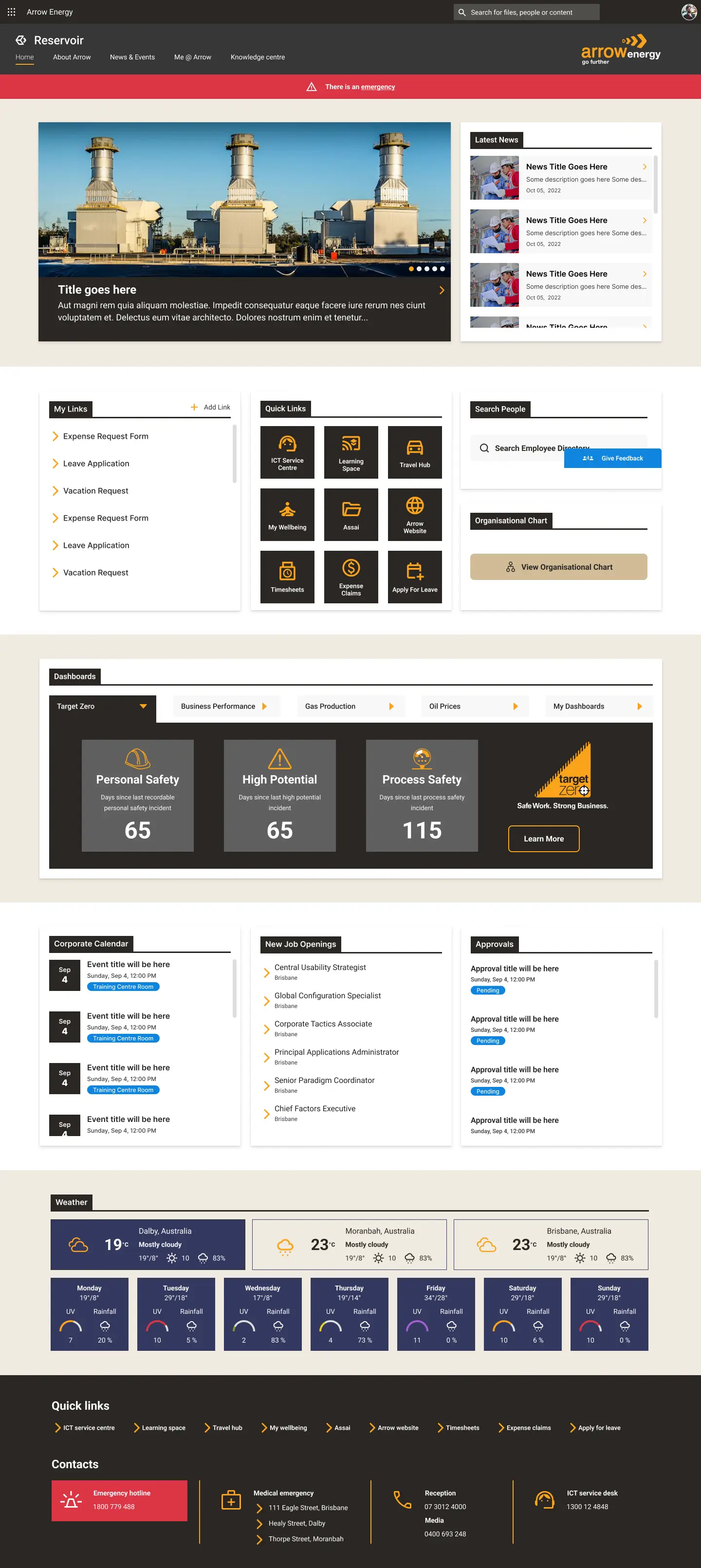
The employee platform home page, live since 2023 - the design system, navigation architecture and content structure landing as production UI.
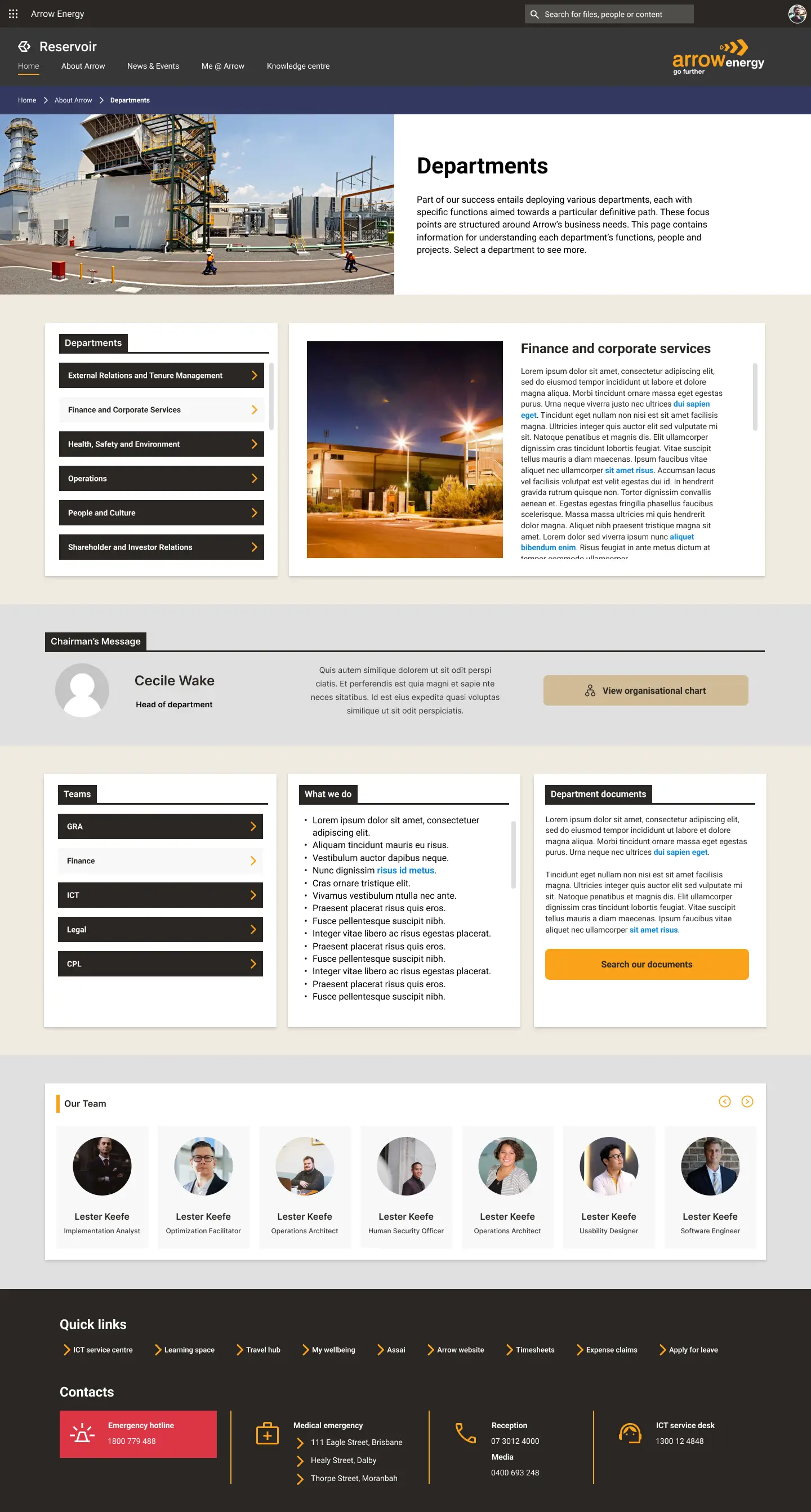
Department pages inherited the system directly - same grid, same components, same interaction patterns.
Stack and tooling
- Platform
- Extension framework
- Component library
- Configuration and content
- Personalisation and processing
- Workflow platform
- Design
- Design engineering artefact
What I took away
- The system-thinking that ships design engineering wasn’t invented in 2026 with AI coding agents - it was the same discipline applied to whatever platform the work was on
- Platform-native first, then custom, is the same design principle as design-system first, then escape hatch. The framing changes; the discipline doesn’t
- Design specifications should be written to be built from, not translated from. Production-ready Figma was the 2022 version of the executable Storybook stories that ship at Downer now
- Constrained inputs produce richer systems than unlimited toolkits. The constraint forces the thinking to be visible
Details
The work is above. This is the rest of what you'd want before a first call.
- Sydney's Northern Beaches, relocating to San Diego.
- Senior Forward-Deployed Engineer at Insight, AI Apps & Data. Four years, four platforms, sole design engineer on two of them.
- A seven-week paid discovery that either converts or doesn't. Twenty engagements, seventeen customers, eleven won.
- I'm Australian, so the route is the E-3, not the H-1B. It's Australia-only, has never filled its quota, and skips the H-1B lottery entirely.
Elsewhere
- PUN·KIT (opens in a new tab)
A drum kit that plays puns. No client, no brief, no budget - it has its own domain and its own bad jokes.
- Inside my AI design engineering workflow (opens in a new tab)
How the Downer work was actually made: Storybook with MCP, axe-core gates, and Claude Code generating against a real design system.
Getting in touch
Email is best, and it reaches me directly.